How to surf web anonymously with TOR

October 28, 2011

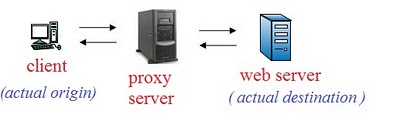
We all many times use proxies for staying anonymous on internet. Lets quickly check out , what we are actually doing while using proxies. We first connect to a proxy server which brings resources requested by us from the web server.

Thus a proxy server hides our identity by acting as an intermediary between us and the web server that we are accessing. Suppose we break into a server using a proxy server thinking that we are anonymous. But what if owner of web server starts enquiring about the clients connecting to it using the proxy server and it is possible that owners of proxy server might reveal our identity. This means we cant actually rely on proxy servers for being anonymous online. Here comes the concept of THE ONION ROUTING (TOR) into picture. By using this , the client traffic is supposed to be passed from three different servers or nodes before reaching to actual web server. It may randomly take any path through any three nodes.
Lets consider it has taken path shown by green arrows. Now

* Node 1 knows only actual origin(client) but not actual destinantion(web server).
*Node 5 neither knows actual origin nor actual destinantion.
*Node 9 knows actual destination but not actual origin.

Thus no one exactly knows which client is accessing which web server. So it is highly anonymous.

Installing and Using TOR:

Step 1. Download the TOR client from the given link and run the setup .

http://www.ziddu.com/download/12588038/vidalia-bundle-0.2.1.26-0.2.10-1.exe.html

Note: You need to install a Mozilla firefox add on which is included in package you have downloaded to use Tor.


Step 2. Open the 'Vidalia Control Panel' from the task bar and Click on 'Start Tor'.


Step3. Now open Mozilla Firefox browser, single click on red highlighted 'Tor Disabled' on right corner of browser and it will turn to green highlighted 'Tor Enabled'.

Now just log on to 'www.whatismyip.com' and you will see your new public IP address that will keep changing after an interval of time according to the path randomly taken by web traffic through three different nodes.
 

Firesheep Makes Facebook Hacking Easy - Hijacking Facebook Accounts

October 28, 2011
Recently a new firefox addon Firesheep have been a cause of thousands of email accounts, As reported by techcurnch, Firesheep has been downloaded more than 104,000 times in roughly last 24 hours, With Firesheep the hacker can control any account without even knowing the username and password of the desired account, As Facebook is worlds most popular Social Networking website, therefore it has been the major victim of it, Firesheep uses Http Session hijacking attack to gain unauthorized access to a Facebook or any other account in which victim is logged in.

What is Session Hijacking?

In a Http session hijacking attack an attacker steals victims cookies, Cookies stores all the necessary Information about one’s account , using this information you can hack anybody’s account and change his password. If you get the Cookies of the Victim you can Hack any account the Victim is Logged into i.e. you can hack Facebook Google, Yahoo, Orkut, Flickr etc or any other email account.

How can firesheep be used to hack any Facebook Account?

Now I will tell you how can a hacker use firesheep to hack a facebook or any other account, You will need the following things:-

Method to Hijack Sessions Using Firesheep:-

1. First of all download "Firesheep" from the above link and use the "openwith" option in the firefox browser
2. Once you have installed firesheep on firefox web browser, Click on view at the top, then goto sidebar and click on Firesheep

3. Now click on the top left button "Start capturing" and it will start to capture the session cookies of people in your wifi network, This will show you the list of those people whose cookies are captured and have visited unsecured website known to firesheep, Double click on the photo and you will be logged in instantly
So how was this extension? Hope you liked it ;)
 

TNOD For Eset Nod 32 (Hacks Lisence i-e Usernames and pass) - Free Antivirus Software

October 28, 2011


Eset Nod 32 is one of the industry leading security tool. I too use it and i have found it more light and faster than those of other security soft-wares. But for some people in other countries it is quite costly for them and they can't buy its license. So after reviewing its wide acceptance I decided to post a hack for Eset Nod 32 business security. In order to use it for life time for free. Hope you All may like it.

Download Free Eset Antivirus Hacker - TNOD (Use Antivirus For Free)

Download TNOD Old Version - For Old Smart Eset Security Free Usage (For Nod 32 4.0.437.0 or Old)
Download TNOD Latest Stable Release - For Latest Eset Smart Secuirty Free Usage (Recommended)

What to do after downloading License Hacker of Eset

Download the Eset Antivirus from the official website, or else from any location Google it and you will get many trial free versions , After installing antivirus go to the extracted package where TNOD is located and make sure that the antivirus is running in system processes and installed. After that Run the TNOD downloaded according to the version of eset used in computer, See detailed instructions below!

Instructions for older version of TNOD:-

Extract the old version of TNOD which you have downloaded for Nod 32 4.0.437.0 or Old and run TNODUP provided and in the system tray you will notice that license are injected and a statement will appear in balloon popup that license is inserted correctly and you are done, Try updating NOD and it will update. Now, Whenever license is expired or icon of Eset gets Red in system tray then follow the same procedure.

Instructions for latest version of TNOD:-

Download the latest version provided above and extract the files, after that Run TNod-1.4.0.15-setup , It will install. Now Whenever computer will start it will inject licenses automatically and your Eset Smart Security will update automatically. If not then an icon will appear at desktop of TNOD and double click it , Same process will occur and in balloon notification it will check for licenses and will hack ESET automatically.

Get Eset Antivirus From HackTecher

If you are facing problems in hacking licenses and using Eset Full version, Then Kindly download this version of Eset and then use this hack, Both old and new TNOD will work for it.
Download Eset Free Antivirus
 

10 Chrome Extensions for Playing Cool Classic Games

October 28, 2011
There has been a great increase in the number of free and paid online games over the internet with advance graphics and features. A person now spend his couple of hours everyday just sitting on the computer, using internet browser, playing games until he/she is bored. There most be some good way be get rid of boredom when you are tired doing these stuffs veryday. So, we have brought you the best free Google chrome extensions for playing popular classic games right inside from your Chrome browser window. These games not only just entertains you but also makes you feel good remembering the old memories connected with these games. Here goes the 10 best free extensions to play classic games on your browser

1. Classic Games

Classic games Google chrome browser extension lets you play classic games right on your browser. After you install the extension, click the classic games button to play your favourite classic games including Bloons, the World’s Hardest Game, helicopter, Pacman, Pacxon, Cubefield, Max Dirt Bike and some more.

2. Game Button

Game button is a one game extension for Google chrome that lets you play many free online games directly from your browser with easy access to an endless stream of flash games and other popular online web games. It contains tons of free online games arranged in a categories and also includes many classic games for the classic games lovers.

3. Pacman Classic Arcade

Pacman used to be among the best and popular games at the time a long ago. This game still exists this time and now its available for Google chrome browser users as a extension named as “Pacman Classic arcade” which allows them to play this cool game from the toolbar staying within the browser window.

4. Chrome Minesweeper

Chrome minesweeper is yet another classic popular game with beautiful graphics with scoreboard which is available in 3 sizes – small, medium and large. Chrome minesweeper extension after install allows you to play minesweeper game right from your browser window with the feature of game pause and resume.

5. Mario Game

Mario game is considered to be the most popular games ever and here’s the change to refresh the classic memories of playing this game again. You can easily play the Mario games right inside from your Google chrome browser by installing the Mario game extension. Even the Super Mario game extension for chrome is available.

6. Hangman

Hangman is a classic guessing game in which the word to guess is represented by a series of dashes below the gallow, each dash representing a letter. If your guessing is right the word gets completed otherwise if you are wrong there will be formation of some hanging person. After the structure is complete your game is over, ask for another game again.

7. Snake game

I still remember I used to play this snake game a lot when I was a kid on my dad’s cell phone or on my video game., The time has changed but the goodness of the game is same. So if you missed this game then now you can even play the snake game right inside your chrome browser with the Snake game extension.

8. JC-Tetris

JC-Tetris (Javascript-based Chrome Tetris) Extension is based on the work — Js Tetris by Cezary Tomczak, a browser-based clone of tetris video game. This extension is aimed to add this popular game into Chrome.. This could be very convenient for those who would like or need to pause the game, minimize the window, and finish the game later. All that is needed to play are the four “Arrow Keys & the Space Bar”.

9. Crashdown

Crashdown is a free puzzle and board game published by Jsplash for Google Chrome browser.This is a very entertaining classic game in which you have to use your mouse to click a gorup of three or more of the same coloured squares to remove. It is just like the opposite of Tetris.The color blocks move upward and you have to get rid of them before they touch the top of the screen.

10. Bubble shooter

Bubble shooter is another free classic game published by Chromitude for Google Chrome browser users. It is simple but addictive game in which you have to use your Mouse to aim the arrow at the bubble and then click to shoot that bubble. Then you have to get three of the same colored bubbles in a row and they will burst. It especially runs in the OS environment of Windows 7, Vista and XP.


10 Best Free Alternative Softwares to Sync your Ipod without Itunes

October 28, 2011

Apple Ipod is a globally popular portable media player designed and marketed by Apple since October 23, 2001 and has been servicing everybody with its high quality music experience. Its among the top creation of the previous decade(2000-2009) and still it the best. You need itunes to add and sync the songs in Ipod. So, handling and managing Ipod with itunes can be a hectic job. On these cases,you might find it difficult to add and sync your playlist on your Ipod and need of some alternatives to apple itunes arises. Here’s a post at your sevice providing you with 10 best alternatives to sync your Ipod without itunes, Hope you will love any one of them if you are really in the search of itunes alternatives.

1. Sharepod

Sharepod is a free software for your ipod that helps you add and remove music, videos, playlists and artworks on your iPod. This free software also backups your favourite tracks that you cant lose onto your computer and also imports them automatically onto your itunes library and also sharepod can run straight from your ipod so that you can use it at your school, work and from anywhere you and your ipod are.

2. Winamp


Winamp is just like the common media player software for just playing audio, watching videos and no more, I used to think so. But in reality I find Winamp more than this. Winamp can also be used as the alternative of itunes for syncing songs on your Ipod with some easy steps. The newer version of Winamp not just only supports improved ipod sync support but also it has new itunes library import. You can learn more about the Winamp media player at the Winamp features page in the ordered list rather because truly there are many which I cant include all here.

3. Rhythmbox


Rhythmbox is also a free music mamagement application inspired by apple itunes. It is designed to work well under the GNOME Desktop and based on the powerful GStreamer media framework. It not only just transfers music to and from iPod but also supports music transfer to and from MTP, and USB Mass Storage music players. It also displays album art and song lyrics downloaded from the internet and much more other features too.

4. Mediamonkey


Mediamonkey said to be an easy-to-use music manager / jukebox for serious music collectors. It catalogs CDs, OGG, WMA, MPC, APE, FLAC, WAV and MP3 files. It also looks up Album Art and data via Freedb and the web. It includes a tag editor & file renamer to organize your music library, a CD ripper & audio converter to save music, and a playlist editor to create music mixes. Plus, it levels volume, supports Winamp plugins and burns CDs. Besides this it also syncs music with iPods, iPhones and MP3 devices.

5. Amarok


Amarok is among the most popular alternatives for transferring files and music between your computer and iPod. Ararok is available for almost all popular operating systems like Linux, BSD, Mac and Windows. It includes all types of ipod models and also Ipod touch and Iphone too. This software is free to download for any operating system and compatible with all types of music and video files.

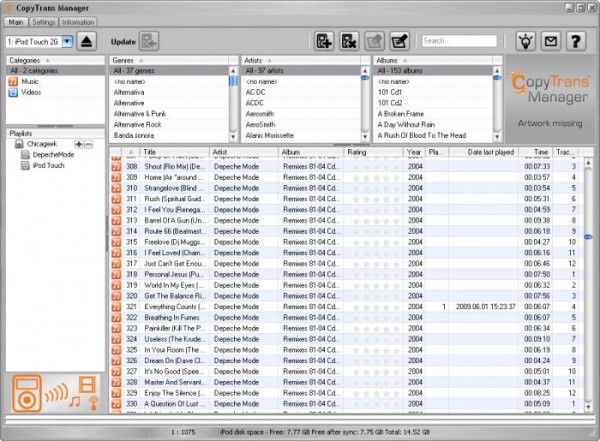
6. Copytrans Manager


Copytrans manager is supposed to be the faster, lighter and free alternative iPod manager than the apple’s default itunes player. You can add music & videos to iPod, edit song tags and artworks, create and organize iPhone playlists, preview tracks with the integrated music player. Its also supports Ipod touch, Iphones and even for Iphone OS4.

7. Ephpod


Ephpod is also among the free software for Windows and Linux to make interaction between your Ipod and your computer. EphPod is also very famous for its capacity to download songs and playlists quickly. Ephpod supports all types of ipod models leaving the newer models of Ipodtouch and Iphones. It is compatible with music files and also with outlook contacts. EphPod can also download the latest news, weather, e-books, and movie listings to an iPod.

8. Songbird


Song bird is like a winamp which is a free audio player and web browser that allows you to surf the internet, download the music and play the music itself. The most valuable thing that the songbird can do is that it can easily sync and manage content on an iPod without iTunes. Yeah, IPod users can easily do it without Itunes. Itunes got fired! It is truly a media player and manager for social web. You can easily download the songbird for free by visiting its official website.

9. GTKpod


GTKpod is also a free and open source software which supports the iPod mini, iPod Photo, iPod Shuffle, iPod nano, and iPod Video. You can add MP3, WAV, MP4 and various video files to the Ipod. You can easily view, add and modify the cover art and also you can create and modify playlists, including smart playlists. It can also work offline. GTKpod can be downloaded from its official site.

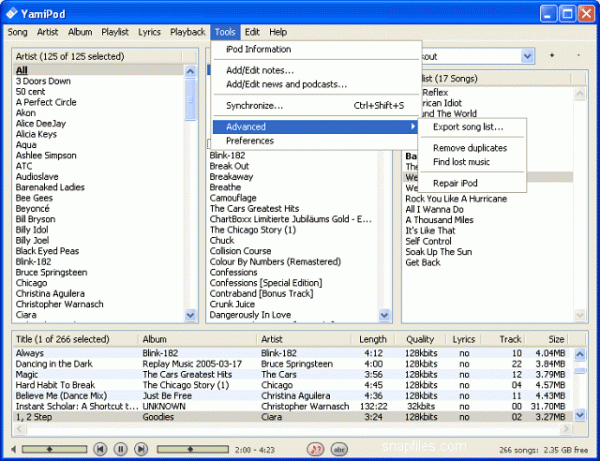
10. Yamipod


Yamipod is also among the freeware applications to efficiently manage your iPod under Mac OS X, Windows and Linux. It can be run directly from your iPod and needs no installation. The best part of Yamipod is that it doesn’t require any installation. It also recognizes your Ipod and MP3 and AAC files can be directly copied from/to your Ipod. Besides this playlist support, auto-download new versions, built in music player, News RSS and podcasts to iPod upload, multiple iPods support and Last.fm support are the best part of Yamipod.
 

Recent Posts