How to surf web anonymously with TOR
Posted by Alice on Friday, October 28, 2011
Under: Hacker's Tricks
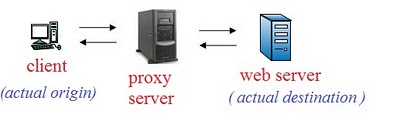
We all many times use proxies for staying anonymous on internet. Lets quickly check out , what we are actually doing while using proxies. We first connect to a proxy server which brings resources requested by us from the web server.

* Node 1 knows only actual origin(client) but not actual destinantion(web server).
*Node 5 neither knows actual origin nor actual destinantion.
*Node 9 knows actual destination but not actual origin.
Thus no one exactly knows which client is accessing which web server. So it is highly anonymous.
Installing and Using TOR:
Step 1. Download the TOR client from the given link and run the setup .
http://www.ziddu.com/download/12588038/vidalia-bundle-0.2.1.26-0.2.10-1.exe.html
Note: You need to install a Mozilla firefox add on which is included in package you have downloaded to use Tor.


Now just log on to 'www.whatismyip.com' and you will see your new public IP address that will keep changing after an interval of time according to the path randomly taken by web traffic through three different nodes.
In : Hacker's Tricks